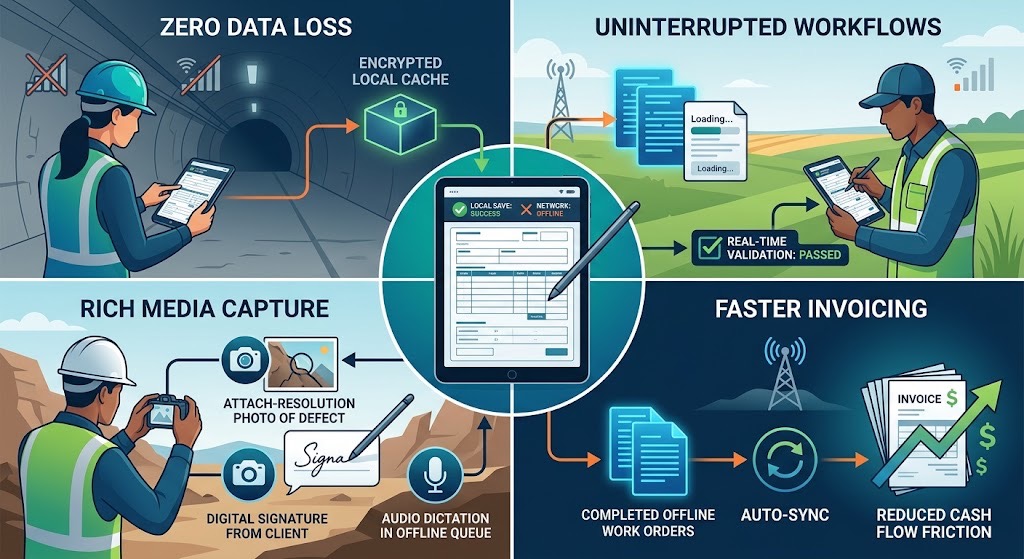
For businesses that work outside the office, having access to reliable information is essential. Whether employees are inspecting job sites, completing service calls, conducting safety checks, or collecting customer information, they need tools that work wherever the job takes them.
But there is one challenge that many businesses still face: internet connectivity.
Field employees often work in locations where Wi-Fi is unavailable or cellular coverage is unreliable. Construction sites, remote properties, industrial facilities, basements, and rural locations can all make accessing online tools difficult.
This is why offline forms matter.
With offline digital forms, employees can collect information, complete inspections, capture signatures, and document work without needing an active internet connection. Instead of relying on paper or waiting until they return to the office, they can continue working without interruption.
What Are Offline Forms?
Offline forms are digital forms that can be accessed and completed without an internet connection.
Unlike web-based forms that require a continuous connection to a server, offline-capable mobile form applications allow employees to enter information directly on their devices. Completed records can be saved locally and synchronized or transferred when connectivity becomes available, depending on the application.
This means employees can continue completing job reports, inspections, checklists, and other business documents regardless of where they are working.
For businesses with employees regularly working in the field, offline forms provide a practical way to maintain consistent data collection without depending on network availability.
5 Reasons Offline Forms Are Important for Field Businesses
1. Keep Work Moving Without an Internet Connection
One of the biggest advantages of offline forms is that employees don’t have to stop working when an internet connection disappears.
Imagine a construction inspector completing a site inspection in an area with no cellular coverage. With an online-only application, the inspector may be unable to access the required form or submit inspection results.
With offline forms, the inspector can continue documenting findings, recording measurements, taking notes, and capturing signatures.
The work gets completed when it happens, rather than being postponed until an internet connection becomes available.
2. Reduce Paperwork and Manual Data Entry
Without offline digital forms, field employees often fall back on paper documents when connectivity is unavailable.
This creates additional work. Someone eventually needs to transfer the handwritten information into a computer, database, or digital report.
Manual data entry takes time and increases the risk of errors, missing information, and illegible handwriting.
Offline forms eliminate much of this extra work by allowing employees to enter information directly into digital fields. Data can be saved electronically and used to generate completed PDF reports or transferred to other business systems.
The result is less paperwork and more consistent information.
3. Capture More Accurate Information at the Job Site
The longer employees wait to document their work, the greater the chance that important details will be forgotten.
An employee who completes an inspection at 10 a.m. but cannot submit the report until returning to the office may struggle to remember every observation, measurement, or issue.
Offline forms make it possible to record information immediately.
Employees can document inspection results, add comments, capture photographs where supported, and collect customer or supervisor signatures while they are still at the job site.
Recording information as the work happens helps businesses maintain more complete and accurate records.
4. Improve Productivity for Field Employees
Field employees should spend their time completing work, not troubleshooting internet connections or looking for paper forms.
When digital forms are available offline, employees can move between locations without worrying about whether they will have access to the internet.
This is particularly useful for:
- Construction companies conducting site inspections and safety checks.
- Field service businesses completing maintenance and repair reports.
- Property managers conducting property inspections.
- Healthcare professionals collecting information during field visits.
- Transportation companies completing vehicle inspections.
- Environmental teams recording observations and compliance information.
By removing connectivity as a barrier, offline forms help employees complete more of their work without unnecessary interruptions.
5. Maintain Consistent Documentation Across Your Business
Businesses need consistent records, regardless of where employees work.
Using paper forms in locations without internet access and digital forms everywhere else can create inconsistencies in how information is collected and stored.
Offline-capable digital forms provide a more consistent approach. Employees can use the same form templates and follow the same procedures whether they are working in the office, on a customer site, or in a remote location.
This makes it easier for managers to review completed work, maintain records, and ensure employees are collecting the information the business needs.
What Should You Look for in an Offline Form Application?
Not all digital form applications offer the same offline capabilities. Some require an internet connection to open forms, while others allow employees to complete forms offline but provide limited options for saving or sharing completed records.
When evaluating an offline form application, consider the following capabilities:
Offline form creation and completion: Employees should be able to access and complete forms without an active internet connection.
Automatic saving: Entered information should be saved on the device to reduce the risk of losing work.
PDF generation: Completed forms should be exportable as professional PDF documents that can be shared with customers, managers, or other departments.
Photos and signatures: The application should support collecting the additional information required to document field work.
Multiple device support: Consider whether employees need to use iPads, iPhones, Android devices, Mac computers, or PCs.
Synchronization options: If multiple employees or office staff need access to completed records, look for an application that supports synchronization when an internet connection becomes available.
It is also important to understand where information is stored and how it is synchronized. Offline functionality should be a core part of the application, not simply an option that allows employees to temporarily enter information before requiring an internet connection.
Offline Forms Are More Than a Convenience
For businesses that depend on employees working outside the office, offline functionality is not just a useful feature. It can directly affect productivity, data accuracy, and the ability to complete work on schedule.
An application that only works when an internet connection is available creates unnecessary limitations for field employees.
Offline digital forms give businesses greater flexibility. Employees can complete inspections, collect information, document work, and generate reports without waiting for connectivity.
When combined with digital form templates and electronic recordkeeping, offline forms help businesses move away from paper-based processes and create more efficient ways to collect and manage information.
Take Your Business Forms Anywhere with FormConnections
FormConnections provides digital form solutions designed for individuals, power users, and organizations that need reliable ways to collect and manage information.
Whether you are an individual professional replacing paper forms, a power user looking for advanced form capabilities, or an organization managing forms across a team, FormConnections offers a solution to help you work more efficiently.
Your business doesn’t stop when the internet does. Your forms shouldn’t either.
Explore the FormConnect solutions and find the right digital form application for the way you work.