
FormConnect v3.6.4: A Fresh New Look with Liquid Glass

We’re excited to announce the release of FormConnect v3.6.4 across the entire FormConnect family — FormConnect Pro, FormConnect Pro+, and FormConnect ProMax.

This release introduces a redesigned user interface with a cleaner, more modern appearance, along with several improvements that make creating and working with forms more flexible.

A Redesigned Interface with Liquid Glass

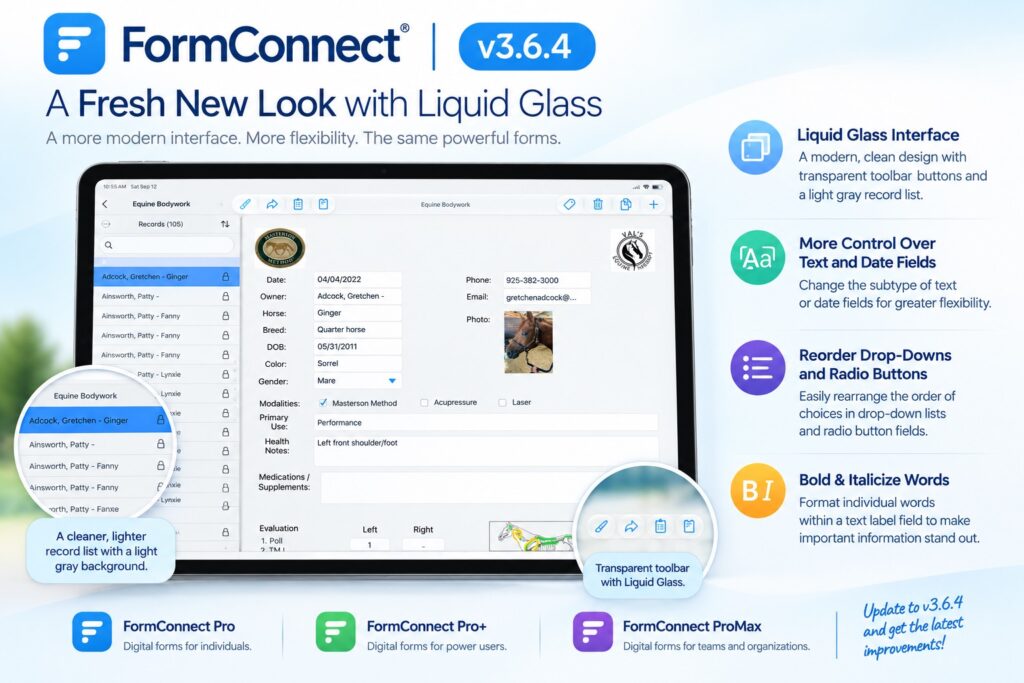
The biggest change in v3.6.4 is the updated user interface, including support for Liquid Glass.

The toolbar has been redesigned with a more transparent, lightweight appearance, giving the interface a cleaner look while keeping the tools you use most easily accessible.

We’ve also updated the record list on the left side of the screen with a light gray background. The new design provides better visual separation between the record list and the form while creating a more balanced overall appearance.
More Control Over Text and Date Fields

Version 3.6.4 also adds the ability to change the subtype of a text or date field.

This gives form designers greater flexibility when refining an existing form without having to recreate a field from scratch.

Reorder Drop-Down and Radio Button Options

We’ve made another useful improvement for form designers: you can now rearrange the order of choices in drop-down lists and radio button fields.

As your forms evolve, the order of your choices can matter. You can now organize those choices exactly the way you want them without rebuilding the field.

Format Individual Words in Text Labels

Text labels are also more flexible in v3.6.4.

You can now bold or italicize individual words within a text label field. Rather than applying the same formatting to the entire label, you can emphasize specific words or phrases to make important information stand out.

For example, a label could contain a short instruction with one important word in bold or an additional note in italics.

Available Across the FormConnect Family

All of these improvements are included in FormConnect v3.6.4 for:

  • FormConnect Pro — Digital forms for individuals
  • FormConnect Pro+ — Digital forms for power users
  • FormConnect ProMax — Digital forms for teams and organizations

With this release, we’re continuing to improve both the look and feel of FormConnect and the tools available to form designers.

Update to FormConnect v3.6.4 and experience the new interface and latest form-design improvements.

Scroll to Top