Managing communication between your office staff and field technicians can often feel like a juggling act. Between lost paperwork, delayed updates, and miscommunicated details, valuable time slips away.
Fortunately, bridging the gap between your office and the field doesn’t have to be complicated. By leveraging the FormConnect ProMax app, businesses can create a seamless, end-to-end digital workflow that keeps everyone on the same page.
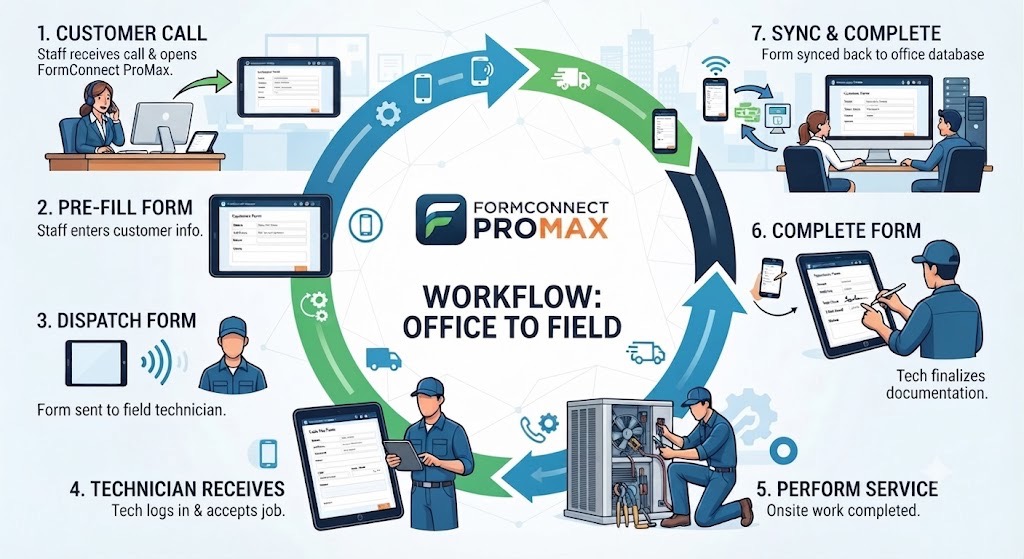
Let’s walk through a real-world scenario showing how FormConnect ProMax transforms a standard service call into a streamlined digital process.
The 7-Step FormConnect ProMax Workflow
1. The Initial Customer Call
The process kicks off in the office. A customer calls requesting an onsite service appointment. Instead of scribbling notes on a sticky note or a paper pad, the office staff member opens FormConnect ProMax to start logging the details immediately.
2. Pre-Filling the Service Form
Using the FormConnect ProMax app, the staff member begins filling out a standardized service form. They capture the essential details right away:
-
Customer name and phone number
-
Service address
-
Description of the issue or requested service
3. Dispatched to the Field
Once the initial information is securely entered into the form, the office staff dispatches the partially completed document directly to the designated technician’s device through the app’s sharing and syncing capabilities. No emails, texts, or physical handoffs required.
4. Receiving the Dispatch in the Field
Out in the field, the technician logs into the FormConnect ProMax app on their mobile device or tablet. The dispatched form appears instantly in their queue. They can review the customer’s contact information and notes before even leaving their current location, ensuring they arrive fully prepared.
5. Performing the Onsite Service
The technician arrives at the customer’s location, diagnoses the problem, and performs the necessary service work. Because they had the pre-filled form handy, the arrival and onboarding process is smooth and professional.
6. Completing the Form Onsite
Once the work is finished, the technician pulls the form back up on their device to finish filling it out. They can add:
-
Parts used and labor hours
-
Diagnostic notes and service outcomes
-
Customer signature and photos of the completed work
7. Syncing Back to the Office
With the job successfully wrapped up and the form fully completed, the technician taps sync. The updated form is instantly transmitted back to the office database. Office staff can immediately view the completed job, generate an invoice, or close out the ticket without waiting for the technician to return to the building.
Why Choose FormConnect ProMax for Your Team?
Implementing a digital workflow like this eliminates the traditional bottlenecks of field service management. By using FormConnect ProMax, your business gains:
-
Real-Time Visibility: Office staff and field techs stay constantly connected.
-
Elimination of Paperwork: Reduce clutter, lost forms, and manual data re-entry.
-
Professionalism: Deliver faster response times and seamless service experiences to your customers.
Ready to transform how your office and field crew collaborate? Take control of your data and streamline your operations with FormConnect ProMax today.