For years, FormConnect has been the gold standard for mobile data collection on iOS. We’ve watched professionals transform their workflows using FormConnect Pro and FormConnect Pro+, moving from messy clipboards to sleek iPads.
But as businesses grow, so does the need for flexibility. Sometimes, a tablet isn’t the right tool for the job. Sometimes, you need the screen real estate and processing power of a desktop.
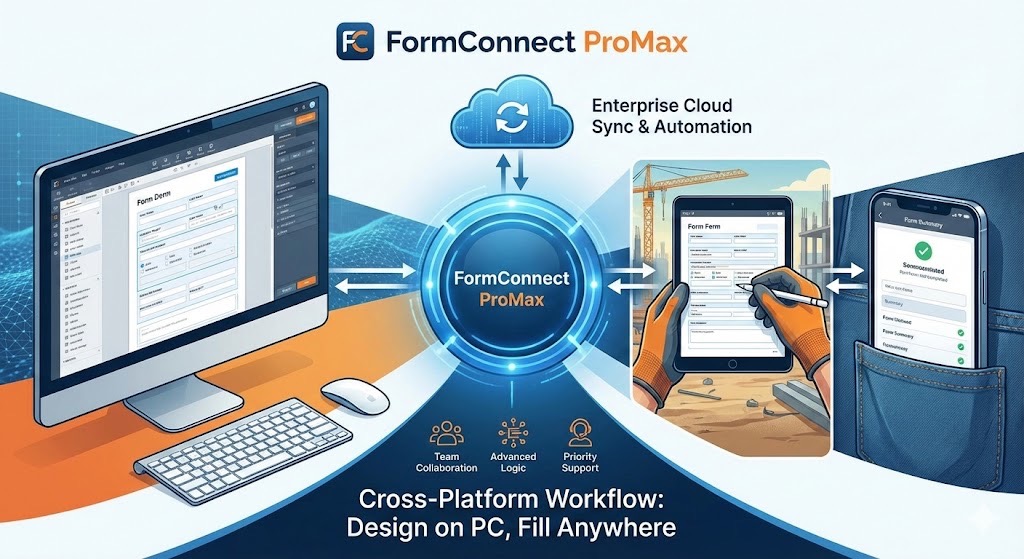
That is where FormConnect ProMax changes the game. While FormConnect Pro and FormConnect Pro+ are fantastic mobile tools, ProMax is a comprehensive cross-platform solution. Here is why the upgrade to ProMax is the smartest move for your professional workflow.
1. The Desktop Advantage: Design on Your PC or Mac
Let’s be honest: designing a complex, 10-page technical form with intricate logic is much easier with a mouse, a keyboard, and a 27-inch monitor.
-
The FormConnect Pro/Pro+ Limit: You are restricted to designing on your mobile device. While the touch interface is intuitive, it can be tedious for high-complexity forms.
-
The FormConnect ProMax Edge: ProMax breaks the “mobile-only” barrier. You can design your forms on your Windows PC or Mac, utilizing the precision of a desktop environment. Once your masterpiece is finished, you can deploy it instantly to your field team’s tablets.
2. Versatility in the Field: Fill Anywhere
Not every field worker carries an iPad. Some prefer ruggedized laptops, and others work from a home office or a job-site trailer.
-
The FormConnect Pro/Pro+ Limit: These apps are tethered to iOS. If a team member doesn’t have an Apple device, they’re out of the loop.
-
The FormConnect ProMax Edge: ProMax allows users to fill out forms directly on an iOS or Mac plus PCs or Android devices. This is a lifesaver for administrative staff who need to input data from their desks or for field engineers who prefer the “laptop-on-the-truck-tailgate” approach. Your data collection is no longer dictated by your hardware.
3. True Team Collaboration and Syncing
FormConnect ProMax isn’t just about individual devices; it’s about a unified ecosystem.
-
Unified Templates: When you update a form on your PC, ProMax ensures that the updated version is what your team sees on their iPad, iPhone or Android devices. It eliminates the “version control” nightmare of emailing files back and forth.
-
Enterprise Workflows: FormConnect ProMax is designed to move data automatically. Whether the form was filled out on a PC in the office or an iPhone in the rain, the data ends up in the same centralized cloud storage, ready for analysis.
4. Advanced Logic for Complex Data
If your business requires “smart” forms that do the heavy lifting for you, FormConnect ProMax is the only choice.
-
Complex Calculations: ProMax features the most robust engine for conditional logic and mathematical formulas.
-
Speed and Scale: It is optimized to handle significantly larger datasets and more complex form structures without the lag that can sometimes affect lower-tier apps when they get “too heavy.”
ProMax vs. The Competition: At a Glance
The Verdict: Is it time to upgrade?
If you are a solo operator who only ever uses an iPad, FormConnect Pro or Pro+ might still be your sweet spot. But if you want the freedom to work across PC and Mobile, the ability to design complex forms with desktop precision, and a way to keep your entire team in sync, FormConnect ProMax is the clear winner.
Stop letting your hardware limit your productivity. Go ProMax and take your forms everywhere.