In the modern enterprise, “paperwork” isn’t just a stack of folders—it’s the digital friction of managing thousands of users, syncing data across global teams, and ensuring everyone is using the correct version of a form. For growing organizations, this “administrative overhead” can quickly become a bottleneck that stifles productivity.
FormConnect ProMax was built specifically to solve this. While its predecessors focused on individual form creation, ProMax is an enterprise-grade engine designed to automate management and centralize control.
Here is how FormConnect ProMax slashes administrative overhead and lets your team get back to high-value work.
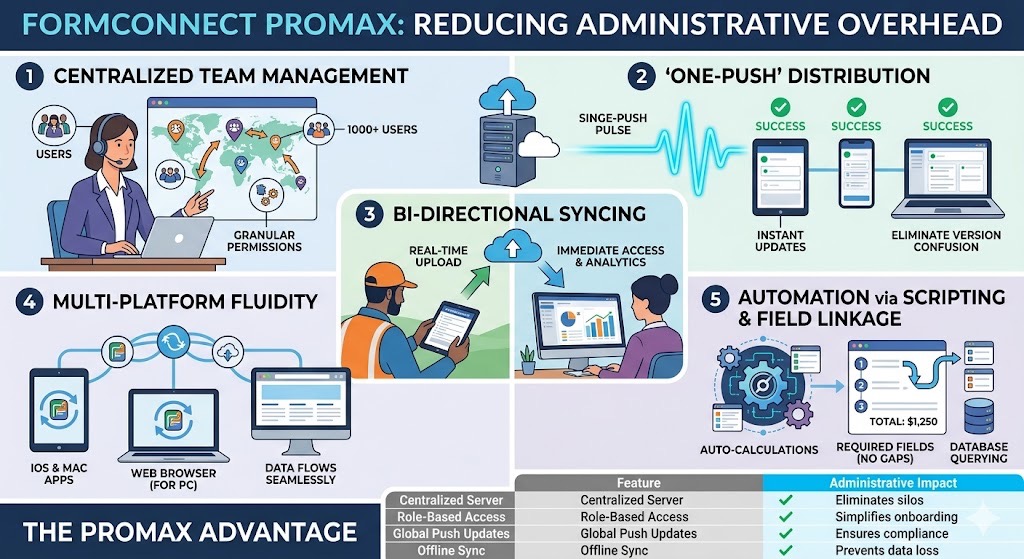
1. Centralized Enterprise Team Management
The biggest drain on administrative time is the manual management of users. In smaller apps, you might have to configure devices one by one. ProMax introduces Enterprise Team Management, allowing administrators to:
-
Create and manage thousands of users from a single web-based dashboard.
-
Assign Granular Permissions: Define exactly who can view, edit, or distribute specific forms.
-
Group Management: Organize users by department or region to push updates to hundreds of people simultaneously.
2. Eliminating Version Confusion with “One-Push” Distribution
When a safety regulation changes or a price list is updated, an administrator’s nightmare is having half the team using the “old” form. ProMax eliminates this risk through Centralized Distribution. When an admin updates a template on the ProMax server, they can “push” that update to the entire organization instantly. There’s no need to email files or ask employees to download the latest version—the next time they open the app, the correct form is already there.
3. Bi-Directional Syncing: The End of Manual Data Entry
Administrative overhead often comes from “double-handling” data—collecting it in the field and then manually uploading or re-typing it into a central database.
-
Real-Time Submissions: As soon as a field agent completes a form, it syncs bi-directionally with the dedicated ProMax server.
-
Instant Access: Office-based staff can view submissions in real-time via a web browser or Mac app, eliminating the lag time between field collection and office processing.
4. Multi-Platform Fluidity (iOS, Mac, and Web)
Often, administrative overhead is a side effect of software incompatibility. If one team uses iPads and another uses Windows PCs, data often gets stuck in silos. FormConnect ProMax bridges this gap by supporting:
-
Native iOS & Mac Apps for high-performance field work.
-
Web Browser Interface for PC users and office administrators. This ensures that the “admin” doesn’t have to act as a translator between different file types or systems; the data flows seamlessly regardless of the hardware.
5. Automation via Scripting and Field Linkage
ProMax isn’t just a digital version of paper; it’s a “SmartForm.” By using Scripting and Field Linkage, you can automate the logic within the forms themselves:
-
Auto-Calculations: Reduce manual auditing by having the form sum rows, columns, and taxes automatically.
-
Mandatory Fields: Prevent “incomplete form” overhead by requiring specific data points before a form can be saved.
-
Database Querying: Pull existing data into a form to save users from typing redundant information.
Summary: The ProMax Advantage