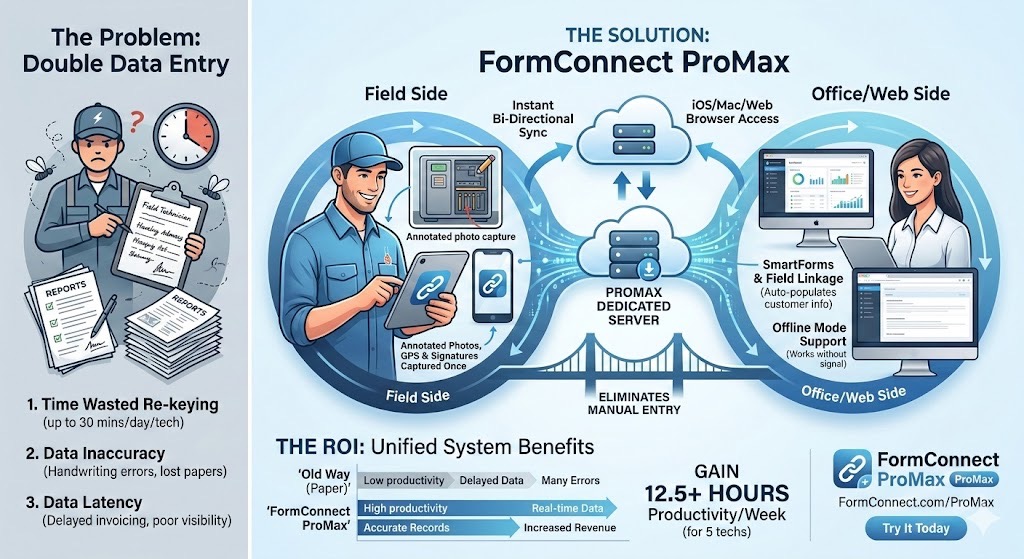
We’ve all seen the workflow: A field technician scribbles notes on a clipboard, snaps a few photos on their phone, and drives back to the office. Then comes the “second shift”—manually typing those crumpled notes into a spreadsheet or ERP system while trying to remember which photo belongs to which job.
Double data entry isn’t just a nuisance; it’s a silent profit killer. Every minute spent re-keying information is a minute not spent on billable work, and every manual transfer increases the risk of “fat-finger” errors. To fix this, you don’t just need a digital form; you need a centralized ecosystem. Enter FormConnect ProMax.
The Cost of the “Paper Trail”
When data lives in two places, your business suffers from three main issues:
-
Data Latency: The office doesn’t know what happened in the field until hours (or days) later.
-
Inaccuracy: Interpretations of messy handwriting or lost scraps of paper lead to bad data.
-
Employee Burnout: Nobody likes doing the same job twice. It drains morale and slows down project momentum.
How FormConnect ProMax Solves the Multi-Entry Problem
FormConnect ProMax is designed specifically for organizations that need to bridge the gap between iOS/Mac mobile users and web-based office users. Here is how it eliminates the “re-typing” phase:
1. Bi-Directional Syncing
The ProMax version introduces a dedicated server environment. Whether a technician is filling out a report on an iPad in a basement or an admin is reviewing records on a PC in the office, the data is uploaded and downloaded automatically. No more manual exports or emailing PDFs back and forth.
2. Advanced “SmartForm” Automation
FormConnect ProMax uses Field Linkage and Scripting to do the heavy lifting for you.
-
Field Linkage: Enter a customer ID once, and watch as the app auto-populates their address, contact info, and history across the form.
-
Calculations: Use spreadsheet-like functions to sum rows and columns automatically, ensuring the field tech and the office see the exact same invoice totals every time.
3. Capture Once, Use Everywhere
Instead of managing a separate gallery of photos, ProMax allows you to snap photos and annotate directly on the image within the form. When the tech hits save, those photos, GPS coordinates, and digital signatures are instantly part of the record accessible by the office.
4. Multi-Platform & Offline Support
Field work often happens where Wi-Fi doesn’t. ProMax allows teams to work offline on iPhone, iPad, or Mac. The moment they reconnect, the dedicated server syncs the changes. This ensures the office staff—who can access the data via any web browser—has a real-time view of progress.
The ROI of a Unified System
The math is simple. If you have 5 technicians saving just 30 minutes a day by avoiding manual data entry, you’ve clawed back 12.5 hours of productivity per week.
Moving Forward
Eliminating double data entry isn’t just about going “paperless”—it’s about going seamless. By utilizing the centralized server and multi-platform capabilities of FormConnect ProMax, you ensure that the data captured at the job site is the exact same data that triggers your billing and reporting.
Ready to see how your specific forms would look in a digital format? Contact us for a free demonstration on how we can convert your most complex paper form.